The first code shows how the text is located in the canvas:
from Tkinter import *

root = Tk()

ch, cw = 200, 200
x0, y0 =   0,   0
x1, y1 =  20,  40

The first code shows how the text is located in the canvas:
from Tkinter import * root = Tk() ch, cw = 200, 200 x0, y0 = 0, 0 x1, y1 = 20, 40

The first code is a simple example:
import Tkinter
root    =  Tkinter.Tk()
ch, cw  =  170, 170
c1 = Tkinter.Canvas(root, height = ch, width = cw, bg = "black")
ps = [   60, 130,  40, 120,  40,  80,  70,  40,
        100,  40, 130,  80, 130, 120, 110, 130]
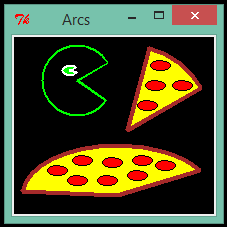
import Tkinter
root    =  Tkinter.Tk()
ch, cw  =  200, 200
c1 = Tkinter.Canvas(root, height = ch, width = cw, bg = "black")
c1.create_arc(30, 30, 200, 200, start = 30, extent = 45, outline = "brown",
fill = "yellow", width = 4)
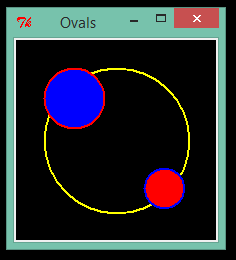
The first code is a simple example:
import Tkinter
root    =  Tkinter.Tk()
ch, cw  =  200, 200
c1 = Tkinter.Canvas(root, height = ch, width = cw, bg = "black")
c1.create_oval(30, 30, 175, 175, outline = "yellow", width = 2)

The first code is a simple example:
from Tkinter import *
root = Tk()
c1 = Canvas(root, height = 180, width = 200, background = "black" )
c1.create_rectangle( 27, 17, 103,  93, fill = "blue", outline = "cyan")
c1.create_rectangle(103, 93, 179, 169, fill = "red", outline = "yellow")
c1.pack()
root.title("Rectangles")
root.mainloop()

from Tkinter import *
root = Tk()
c1 = Canvas(root, height = 180, width = 200)
c1.create_line(20, 20, 160, 160, fill = "orange"  , width = 3)
c1.create_line(40, 50, 100, 110, fill = "yellow"  , width = 3)
c1.pack()
root.title("Lines")
root.mainloop()
We must create a canvas using the "Canvas" method, also its dimensions are declared here.


import Tkinter as tk
import tkMessageBox
root = tk.Tk()
def info():
tkMessageBox.showwarning("Warning", "Resources changed")
tk.Button(root, text = "Pop up", command = info).pack()
root.mainloop()

from Tkinter import *
def calc_Re():
"""
Re : Reynolds Number
(Adimensional number used to determine
if a fluid flow is laminar or turbulent type)
Re = velocity * diameter / kinematic_viscosity
Re = v__val * d__val / nu_val
(row = 3, column = 1)
"""
if nu_val.get() == 0:
print "Kinematic viscosity must be greater than zero"
lab4.config(text="Nu = 0")

import Tkinter
root = Tkinter.Tk()
button = Tkinter.Button(root, text = "Forgotten Sign", cursor="rtl_logo").pack()
root.mainloop()

from Tkinter import *
def frame(root, side):
# wf : Window Frame
wf = Frame(root)
wf.pack(side=side, expand=YES, fill=BOTH)
return wf
def button(root, side, text, command=None, cursor=None):
btn = Button(root, text=text, command=command, cursor=cursor)
btn.pack(side=side, expand=YES, fill=BOTH)
return btn
class Sample(Frame):
def __init__(self):
Frame.__init__(self)
self.pack(expand=YES, fill=BOTH)
self.master.title("Simpl3")
self.master.iconname("Simpl3")
opsF = frame(self, TOP)
btn0 = button(opsF, LEFT, "About time!", cursor="pirate")
btn1 = button(opsF, LEFT, "Pattern", cursor="rtl_logo")
btn2 = button(opsF, LEFT, "Preloading...", cursor="watch")
if __name__ == "__main__":
Sample().mainloop()


from Tkinter import *
root = Tk()
pic_1 = PhotoImage(file = "8_01.gif")
pic_2 = PhotoImage(file = "8_02.gif")
pic_3 = PhotoImage(file = "8_03.gif")
pic_4 = PhotoImage(file = "8_04.gif")
pic_5 = PhotoImage(file = "8_05.gif")
label = Label(root, image = pic_5)
label.pack()
btn1 = Button(root, image = pic_1)
btn1.pack()
btn2 = Button(root, image = pic_2)
btn2.pack()
btn3 = Button(root, image = pic_3)
btn3.pack()
btn4 = Button(root, image = pic_4)
btn4.pack()
root.mainloop()

from Tkinter import *
class HH_set:
def __init__(self, master):
frame = Frame(master)
frame.pack()
self.songLabel = Label(frame, text = "Spoon - 'Got Nuffin'. Available this summer!")
self.songLabel.pack()
self.xclmLabel = Label(frame, text = "Yeah!")
self.xclmLabel.pack()
self.hearButton = Button(frame, text = "Let's hear it", state = DISABLED)
self.hearButton.pack(side = LEFT)
self.seeButton = Button(frame, text = "Let's see", state = DISABLED)
self.seeButton.pack(side = RIGHT)
self.tuneButton = Button(frame, text = "Tune", command = self.printMessage)
self.tuneButton.pack(side = RIGHT)
def printMessage(self):
print "Channel open"
root = Tk()
root.title("Happy Hour")
base_object = HH_set(root)
root.mainloop()
from Tkinter import *
def frame(root, side):
# wf : Window Frame
wf = Frame(root)
wf.pack(side=side, expand=YES, fill=BOTH)
return wf
def button(root, side, text, command=None):
btn = Button(root, text=text, command=command)
btn.pack(side=side, expand=YES, fill=BOTH)
return btn
class Sample(Frame):
def __init__(self):
Frame.__init__(self)
self.pack(expand=YES, fill=BOTH)
self.master.title("Simpl3")
self.master.iconname("smpl3")
opsF = frame(self, TOP)
btn = button(opsF, LEFT, "About time!")
if __name__ == "__main__":
Sample().mainloop()
# Calculating x**0.5
from Tkinter import *
def square_calc():
x = x_val.get()
sqx = x ** 0.5
print "x =", x, "\t", x, "** 0.5 =", sqx
sqx_txt = Label(root, text = "x ** 0.5 =").grid(row=3, column=0)
sqx_lab = Label(root, text = sqx).grid(row=3, column=1)
root = Tk()
root.title("Calculating square root")
x_val = DoubleVar()
x_lab = Label(root, text = "x").grid(row=0, column=0)
nmb = Entry(root, textvariable = x_val).grid(row=0, column=1)
calc = Button(root, text = "Calculate", command=square_calc).grid(columnspan=2)
y_lab = Label(root, text = " ").grid(row=3, column=0)
root.mainloop()

from Tkinter import *
def printMessage():
print "Channel open"
root = Tk()
root.title("Happy hour")
label_1 = Label(root, text = "Spoon - 'Got Nuffin'. Available since this summer!")
label_2 = Label(root, text = "Yeah!")
label_1.pack()
label_2.pack()
Button(root, text = "Let's hear it", state = DISABLED).pack(side = LEFT)
Button(root, text = "Let's see").pack(side = RIGHT)
Button(root, text = "Tune", command = printMessage).pack(side = RIGHT)
root.mainloop()

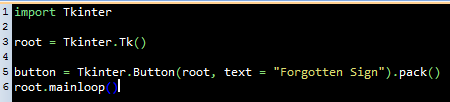
import Tkinter
root = Tkinter.Tk()
button = Tkinter.Button(root, text = "Forgotten Sign").pack()
root.mainloop()

root = Tk()
root.title("Title text that can be changed")